Summary
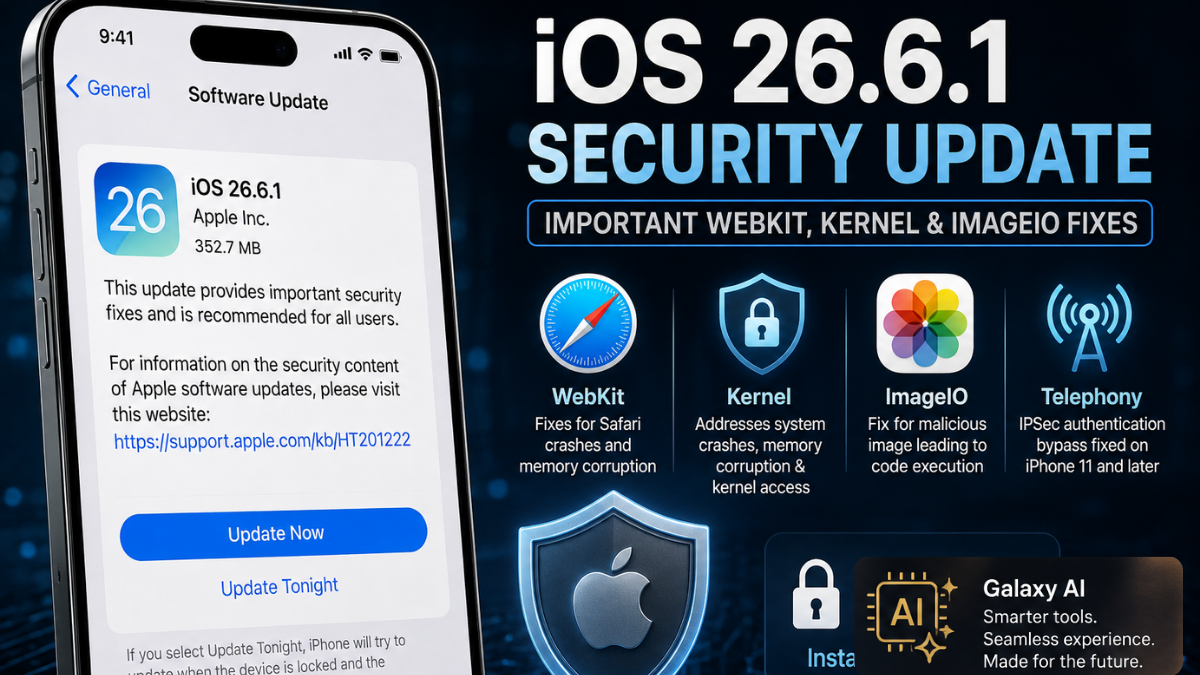
The iOS 26.6.1 update security fixes WebKit Kernel patch is a security-focused release you should install soon, especially if you browse frequently in Safari, handle unknown images, or use your phone on public and workplace networks. Apple says the release brings protections that first appeared in iOS 27 and iPadOS 27 beta builds to supported stable devices.
This isn't a flashy update. No new widgets. No redesigned apps. But it closes flaws that could cause Safari crashes, leak information, terminate the system, and in one case potentially allow arbitrary code execution through a malicious image.
That makes it worth your time.
Apple releases iOS 26.6.1 and iPadOS 26.6.1 with critical WebKit and Kernel patches affecting iPhone 11 and newer iPhones, along with a wide range of iPad models. If your device offers the update, don't leave it sitting in Settings for weeks.
Key Points
- iOS 26.6.1 is primarily a security update, not a feature-focused release.
- Apple has patched vulnerabilities across WebKit, Kernel, ImageIO, IOGPUFamily, Audio and Telephony, among other components.
- Several WebKit vulnerabilities involve memory corruption, use-after-free, out-of-bounds access and malicious web content.
- WebKit security issues can matter beyond Safari because many apps use WebKit-based web views to display online content.
- Apple fixed a WebKit History vulnerability, CVE-2026-64778, that could potentially leak sensitive information after visiting a malicious website.
- Kernel patches address issues involving system termination, kernel-memory access and memory corruption, making them particularly important from a security perspective.
- ImageIO CVE-2026-65346 is one of the more serious fixes because malicious image processing could potentially lead to arbitrary code execution.
- Apple also fixed an IPSec authentication bypass affecting iPhone 11 and later that could potentially allow a privileged network attacker to intercept traffic.
- The security fixes were backported from iOS 27 and iPadOS 27 beta releases to stable devices.
- Supported hardware includes iPhone 11 and newer, along with a broad range of iPad Pro, iPad Air, iPad and iPad mini models.
- Users can check for the update through Settings → General → Software Update.
- The broader lesson is simple: a phone doesn't have to show visible symptoms for an unpatched vulnerability to matter.
What the iOS 26.6.1 security release notes CVE vulnerability fixes cover
Apple's advisory lists security issues across Audio, ImageIO, IOGPUFamily, Kernel, Telephony, WebKit, WebKit History, and WebKit Storage. Some bugs need malicious content or a hostile app to trigger. Others are more concerning because they can be reached while processing web content.
The iOS 26.6.1 update security fixes WebKit Kernel patch includes a notable group of Safari-related repairs. WebKit is the browser engine behind Safari and many in-app web views, so a WebKit issue isn't limited to the Safari icon on your Home Screen. A page opened inside an app may rely on the same underlying technology.
Apple also corrected ImageIO and kernel-level problems. Those are less visible to you, but they matter. Image parsing happens constantly, while the kernel sits at the core of the operating system.
The release also reflects a bigger reality: security maintenance affects far more than phones. Reporting on incidents such as the Ecopetrol cyberattack and a water system cyberattack is a reminder that weaknesses often begin with routine software, identities, or network access.
WebKit and Kernel patches in iOS 26.6.1
Apple patches severe WebKit memory corruption and Safari crash flaws in iOS 26.6.1, including multiple bugs that could be triggered by maliciously crafted web content. In plain English, a harmful webpage could make Safari or a related process crash. In more serious scenarios, memory corruption bugs can create a path toward unintended behavior.
The WebKit Safari crash vulnerabilities iOS 26.6.1 patch covers out-of-bounds access, use-after-free, memory corruption, locking, state-management, and input-validation issues. Apple assigned CVEs to a long list of these fixes, including:
- CVE-2026-64784
- CVE-2026-43795
- CVE-2026-65338
- CVE-2026-65341
- CVE-2026-64782
- CVE-2026-64781
- CVE-2026-65351
- CVE-2026-64715
- CVE-2026-64780
- CVE-2026-65334
- CVE-2026-43794
- CVE-2026-64787
Several additional WebKit issues were credited to researchers and addressed through improved memory handling, checks, locking, input validation, and state management.
That's a lot of browser bugs for one small update.
Meta Red Team X and OpenAI Codex Security report major vulnerabilities patched in iOS 26.6.1, alongside independent researchers, Cisco Talos contributors, TrendAI Zero Day Initiative researchers, and others. Apple credited Amy Burnett of OpenAI Codex Security for several WebKit findings, while Meta Red Team X researcher Nik Tsytsarkin received credit for both Audio and ImageIO issues.
If you've been following the wider discussion around AI-driven testing, reports on Anthropic testing hacks offer useful context. Automated security research can surface real defects, but the finding still needs careful validation, responsible disclosure, and a vendor patch before users are protected.
Why Safari-related bugs deserve attention
You don't need to download a suspicious app for a browser vulnerability to matter. A compromised site, malicious advertisement, or link sent through a message can be enough to expose a browser to hostile content.
Does every Safari crash mean an attack? No. Safari can crash for boring reasons too, including a memory-heavy site or a buggy extension. Still, patches that address crafted web content are exactly the kind you shouldn't postpone.
And there is one more wrinkle: WebKit also has history and storage components. Apple fixed a WebKit History issue, CVE-2026-64778, that could leak sensitive data after you visit a malicious site. It also fixed a WebKit Storage memory corruption issue, CVE-2026-64779, which could lead to a Safari crash.
Kernel fixes address crashes and memory exposure
The iOS 26.6.1 Kernel use after free CVE-2026-65343 fix addresses a flaw that could let a remote attacker cause unexpected system termination. Apple resolved it through improved memory management.
A separate kernel issue, CVE-2026-65349, could allow an app to terminate the system or read kernel memory through an out-of-bounds read. CVE-2026-65330 could allow an app to corrupt kernel memory or force a system termination.
Apple addresses Kernel out of bounds read and use after free flaws in iOS 26.6.1 because these are not the sort of bugs you can judge from your day-to-day experience. Your phone may appear perfectly fine right up until an exploit hits a vulnerable code path.
The iOS 26.6.1 update security fixes WebKit Kernel patch matters here because the kernel has privileged access to system resources. A crash is disruptive. Kernel-memory access can be much worse, depending on what an attacker can combine it with.
ImageIO, Audio, and graphics fixes are not minor details
Apple ImageIO integer overflow arbitrary code execution is one of the more serious phrases in this advisory. CVE-2026-65346 affects how the system processes images. Apple says an integer overflow was fixed through improved input validation, preventing a malicious image from potentially leading to arbitrary code execution.
The Apple iPadOS 26.6.1 update WebKit memory corruption fix gets most of the attention because Safari is familiar to everyone. But ImageIO deserves equal respect. Images arrive through web pages, messages, email, social apps, and cloud services. You won't always know where a file originated.
CVE-2026-65347 is another ImageIO fix. Apple says processing an image could cause a denial of service, meaning an attacker may be able to make an app or device unresponsive rather than take control of it. Annoying? Absolutely. Less severe than code execution? Usually, yes.
How does the ImageIO vulnerability in iOS 26 cause denial of service? A specially formed image can trigger an error in the image-processing path, exhausting or destabilizing the affected process. Apple corrected it with improved checks.
Apple also fixed an Audio logic issue, CVE-2026-65339, that could let an app leak sensitive user information. Meanwhile, IOGPUFamily memory handling improvements detailed in Apple security advisory address CVE-2026-64788, where malicious web content could lead to memory corruption in graphics-related code.
Simple. Effective. Free to install.
Telephony IPSec authentication bypass on iPhone
The Apple iOS 26.6.1 Telephony IPSec authentication bypass fix applies to iPhone 11 and later. CVE-2026-65329 could allow an attacker in a privileged network position to bypass IPSec authentication and intercept network traffic.
What is the IPSec authentication bypass vulnerability in iOS Telephony? It is an authentication flaw in the phone's networking stack. Apple says it improved state management to prevent a suitably positioned attacker from bypassing the expected IPSec checks.
This isn't a bug an ordinary stranger across the street can casually exploit. The attacker needs a privileged place on the network path, which narrows the risk. But corporate networks, public Wi-Fi environments, and targeted attacks are exactly why network-authentication patches shouldn't be dismissed.
These fixes were backported from iOS 27 beta
iOS 26.6.1 delivers essential security fixes backported from iOS 27 beta releases, allowing people on the stable version to receive protections without joining a beta program. That is good news. You don't have to trade stability for security.
Did Apple port iOS 27 beta security fixes to iOS 26.6.1? Yes. Apple explicitly states that these fixes were first available in the iOS 27 and iPadOS 27 betas.
This approach also makes sense from a product perspective. Security patches need to reach the broad installed base, not just early adopters testing the next version. Apple's ability to maintain that base supports Apple’s market position, although Apple supply pressures and its evolving Apple leadership strategy can shape how the company prioritizes products over time.
Compatible iPhones and iPads
The iOS 26.6.1 update compatible devices iPhone 11 and later list includes:
- iPhone 11 and newer
- iPad Pro 12.9-inch, 3rd generation and newer
- iPad Pro 11-inch, 1st generation and newer
- iPad Air, 3rd generation and newer
- iPad, 8th generation and newer
- iPad mini, 5th generation and newer
Which iPhone models support the iOS 26.6.1 security update? If you have an iPhone 11, iPhone SE from a supported generation, or a newer iPhone model that appears in Software Update, you should be eligible.
To check, open Settings > General > Software Update. Back up first if you haven't done one recently, connect to Wi-Fi, and keep your device charged. It usually takes only a few minutes, though download times vary.
Why this update matters beyond your phone
Security patches are part of a larger chain. Your browser, mobile device, applications, accounts, and networks all affect one another. You can see that same pattern in discussions around AI security infrastructure, application security tools, and MCP server security.
A patched phone doesn't make every risky link safe. It does remove known weaknesses that attackers may otherwise reuse.
And that matters more as attacks become more automated. A rogue AI agent breach may sound distant from a Safari crash, but both point to the same habit: apply fixes before a known weakness becomes someone else's opportunity.
Install the update and move on
The iOS 26.6.1 update security fixes WebKit Kernel patch isn't exciting, but that is exactly the point. It quietly closes a sizeable set of weaknesses before they become a problem for your device.
Update your iPhone or iPad, restart when prompted, and keep automatic updates enabled. Then you can get back to using it without giving browser crashes, malicious images, or network-authentication flaws another thought.
GlobalByte Perspective
Apple's iOS 26.6.1 update may look like a routine point release, but the security fixes underneath it make it considerably more important than its version number suggests.
The biggest concern is WebKit. Because WebKit powers Safari and many in-app web views, a vulnerability in the browser engine isn't necessarily limited to someone actively using Safari. Malicious web content can potentially reach the same underlying technology through other apps as well. Apple has addressed multiple memory corruption, use-after-free, out-of-bounds access and input-validation issues in this release.
The Kernel fixes deserve attention too. These are deeper operating-system vulnerabilities that users are unlikely to notice during normal use. One patched issue could allow an attacker to cause unexpected system termination, while others involved kernel memory access or corruption. That doesn't mean every iPhone owner is about to be attacked, but it does explain why delaying security patches is a bad habit.
Then there is ImageIO. Apple fixed a vulnerability where processing a maliciously crafted image could potentially lead to arbitrary code execution. That's particularly relevant because images don't only come from obvious downloads, they can arrive through websites, messages, email and social apps.
GlobalByte Take: iOS 26.6.1 is a good example of why security updates shouldn't be judged by visible features. There may be no new interface or headline feature here, but quietly removing exploitable weaknesses is arguably more important than adding another cosmetic change.
The fact that Apple backported these protections from iOS 27 beta builds to stable iOS 26.6.1 is also a positive move. Users don't need to install beta software just to receive these particular security protections.