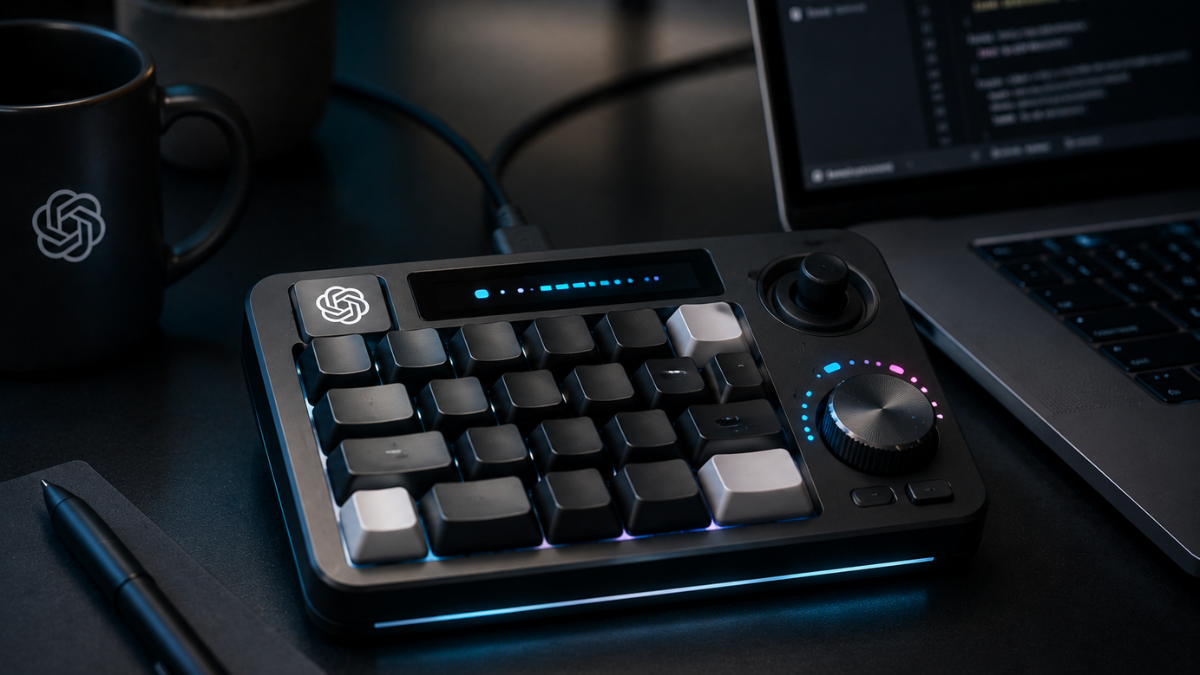
OpenAI just made its first move into physical hardware - and no, it's not the Jony Ive device. The OpenAI Codex Micro mechanical keypad price and specifications are now officially public: a $230 compact macro pad built alongside Work Louder and aimed squarely at developers running AI coding workflows through Codex. It was unveiled at the AI Engineer World Fair in San Francisco, pre-orders are open, and it's already sparking debate about whether it justifies the price.
You can find ongoing coverage of this launch and related developments at Www.Globalbyte.News, which covers Ai hardware, developer Gadgets, and Startup news across the industry.
What Is the Codex Micro?
Officially, it's the kbd-1.0-codex-micro. Work Louder - a Canadian company focused on programmable macro pads for developers - built this alongside OpenAI, marking the company's OpenAI first physical device hardware launch to date. Work Louder co-founder Mike Di Genova has described their approach as building hardware that communicates intent rather than just executing keystrokes. That philosophy shows here.
The layout is minimal by design. Thirteen low-profile mechanical keys, a precision analog joystick with sub-micron-level calibration, and a rotary dial. No display. No standard keyboard layout. Just the controls a developer actually reaches for when managing autonomous task control systems for AI coding workflows. You can configure up to six custom programmable layers using Work Louder's Input app, and VIA software support covers deeper key remapping for anyone who wants it.
Works on Mac. Works on Windows.
OpenAI Codex Micro Mechanical Keypad Price and What's Included
Pre-orders are live at $230 through OpenAI Supply Co as a limited edition desktop accessory. In the box: the Codex Micro unit itself, a Codex Icon Keyset with 32 extra keycaps, warranty coverage, and support access.
Two switch options: silent or clicky. Sam Altman made his preference public, saying he found it "amazing to me that some people want the silent version." Both exist - pick based on your workspace, not Sam's preference.
Live RGB feedback, active chat tracking are the standout features for active development work. It maps the state of your agents and chat sessions in real time, giving you a visual read on what Codex is doing without pulling focus to a browser tab. For anyone running multiple parallel agents - which is increasingly common in serious Codex workflows - that ambient status tracking reduces the constant context-switching that kills concentration.
The Webdev community has been pushing for this kind of hardware-software integration with AI coding tools for a while. This is the most direct answer to that demand yet. Comparing the OpenAI Codex Micro mechanical keypad price against other premium mechanical macro pads price comparison options in 2026, $230 sits at the high end - but most alternatives aren't purpose-built as the best mechanical keypad for managing AI coding agents’ workflows. That specificity is the distinction that matters here, or doesn't, depending on how deep your Codex usage actually goes.
The Rotary Dial: Adjusting AI Reasoning in Real Time
This is what separates the Codex Micro from a generic macro pad.
Adjusting AI reasoning levels with hardware dial control mid-task is the core pitch. Spin the dial toward faster output when you're iterating through options quickly. Push it higher when a complex refactoring job needs the model thinking more carefully. Does it actually make a difference? If you're switching between speed and depth ten times in a session, yes - more than you'd expect. Doing it on a physical dial without touching the UI keeps your hands on the work and your attention where it belongs. Once you've done it in a real session, software-only controls start feeling like a step backward.
The joystick handles common Codex tasks: triggering a debug, running a refactor, mapping to your most-used agent actions. Programmable shortcut keys for software debugging automation are the baseline expectation on any macro pad. The reasoning dial is the differentiator. Both trained coders and vibe-based coders who iterate through prompting can map the layout to their actual workflow - the six layers give you enough room for both approaches.
Hardware supply chains are also shifting in ways that affect what companies like Work Louder can build next. The Samsung Yongin Semiconductor Wafer Fab C facility pulling its production schedule forward to a 2029 target means advanced components are reaching more specialized device makers faster - worth watching for future iterations.
The Jony Ive Device: Not This One
Worth stating clearly: the Codex Micro is not the OpenAI-Jony Ive collaboration everyone keeps waiting for.
That project - reportedly a screenless ChatGPT companion speaker designed for everyday consumer use - is still in development and hasn't shipped. The Codex Micro is a developer tool. Different audience, different design philosophy, completely different product category.
The broader story of AI embedded in physical hardware is moving fast across industries. Research like How Shanghai Meteorological Bureau Ai Ty shows AI integrated into real-time physical monitoring infrastructure at scale - a different domain from a developer macro pad, but part of the same underlying shift toward hardware that responds to AI states rather than just executing static commands.
For Startups building products on top of Codex, this hardware launch signals something worth tracking: OpenAI is interested in owning more of the developer workflow, not just the model layer.
One more thing worth knowing: OpenAI is currently in a legal dispute with Apple over alleged trade secret theft. OpenAI denies the claims, and proceedings are ongoing. It's a notable backdrop for a hardware launch aimed at developers who often live inside Apple's ecosystem.
Teams planning to deploy Codex at scale should also review the Security considerations around autonomous coding agents interacting with existing infrastructure. Corporate governance guidelines for deploying automated coding agents at scale aren't glamorous - but they matter once you move beyond individual developer use.
Before You Pre-Order
The OpenAI Codex Micro mechanical keypad price and specifications make a clear case for a specific type of developer. At $230, with live RGB feedback for active agent tracking, a sub-micron precision joystick, a reasoning-level dial, six programmable layers, and 32 bonus keycaps, the hardware is genuinely capable. But it's not for everyone - and there's no honest argument that it should be.
If Codex is embedded in your daily workflow, if you're managing multiple agents, running debugging pipelines, and context-switching constantly, the physical hardware removes friction you didn't realize was adding up. If you use Codex occasionally or you're still getting started with AI-assisted coding, there's no real case for spending $230 here.
Tech is accelerating across every domain at once. Projects like Tianwen 2 Quasi Moon Kamo Oalewa Image 1 - China's mission generating 1km navigation data from a quasi-moon - exist alongside Science breakthroughs in AI monitoring and now developer peripherals like the Codex Micro as evidence of the same underlying trend: AI workflows are gaining dedicated physical infrastructure, one domain at a time. Whether you need this particular piece of it comes down to one honest question: how much of your day actually runs through Codex?